![lenderlogo.png]](https://knowledgebase.lenderhomepage.com/hs-fs/hubfs/lenderlogo.png?height=40&name=lenderlogo.png)
Accessing Your Loanzify Account
Summary: This article outlines the steps to access your Loanzify account, including password reset procedures.
If You Forgot Your Password
-
Request a Password Reset:
- If your password is not working, you can request a password reset. Ensure you provide the email address associated with your account. Click the Forgot Password to initiate a password reset.
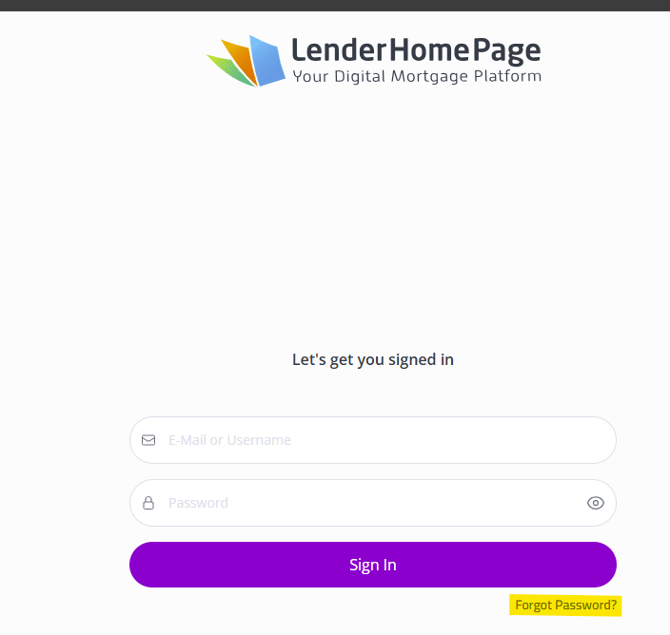
- If your password is not working, you can request a password reset. Ensure you provide the email address associated with your account. Click the Forgot Password to initiate a password reset.
-
Check Your Email:
- After requesting a reset, check your email for an activation code or reset link. If you do not receive it, verify that you are checking the correct email address and that it is not in your spam folder.
-
Use Provided Credentials:
- If you have received temporary login credentials, use them to access your account. For example:
- Visit the login page at Lender Homepage
- Enter the email and password provided by support. Once you are into the system you will want to update to your desired password. This can be done via the Profile
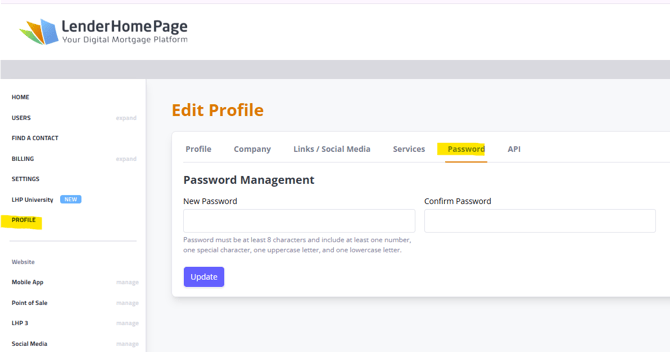
- If you have received temporary login credentials, use them to access your account. For example:
Troubleshooting Access Issues
- If you are still unable to access your account after following the above steps, consider reaching out to customer support for further assistance. They can help reset your password directly or provide additional troubleshooting steps.
Conclusion
Accessing your Loanzify account can be done through a password reset or by using temporary credentials provided by support. If issues persist, contacting customer support is recommended for further assistance.